Create a custom windshield board
How to Create a Custom Windshield Streamer
Creating a custom windshield streamer (sun strip) is perfect when a customer requests a specific height instead of using our standard templates. This tool allows you to easily tailor both the height and the curvature to get a natural, perfect fit directly from a standard windshield template.
Step-by-Step Guide
- 1. Load the Windshield: Load a windshield from the pattern selector onto your canvas. Ensure the top of the windshield is facing upwards. Tip: You can easily identify the top by looking for the rearview mirror or rain sensor cutouts.
- 2. Select the Pattern: Click once on the windshield pattern so it is highlighted with a selection rectangle.
-
3. Open the "Create Board" Tool:
Go to the Tools section on the left side of the canvas. Look for the tool icon that looks like a windshield (you can hover over it to verify it says Create board). Click the icon to open the adjustment dialog.
-
4. Adjust Height & Curvature:
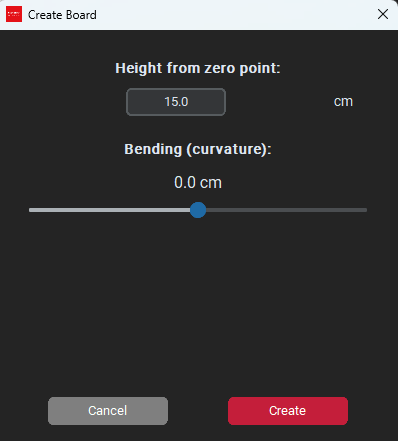
In the dialog box, you will see two parameters to adjust:
• Height from zero point: Set this to your desired height from the top of the windshield.
• Bending (Curvature): Use the slider to adjust the curve at the bottom of the streamer. A slight curve usually looks much more natural from the outside than a completely straight line. -
5. Preview & Create:
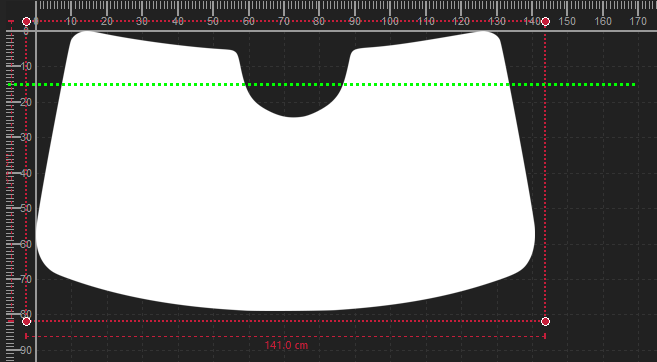
As you drag the sliders, watch the green line across the windshield on the canvas—this is a live preview of your cut. Once you are happy with the shape and height, click Create.
- 6. Remove Excess Film: Your streamer is now separated from the rest of the windshield. Click on the bottom, leftover part of the windshield (it will be marked with a red rectangle). Right-click and choose Delete, or simply press the Delete key on your keyboard.
Ready to Cut: You now have a perfectly customized windshield streamer ready to be cut!
Bonus Tip: If you want to use this exact custom shape again in the future, select the new streamer, go to the Tools section, and click Save pattern to store it in your private database.
Bonus Tip: If you want to use this exact custom shape again in the future, select the new streamer, go to the Tools section, and click Save pattern to store it in your private database.
Was this article helpful?